Checked on 6 Nov 2026 against the paas.build reference files
How to combine subscriptions and credit top-ups for an AI app (2026)
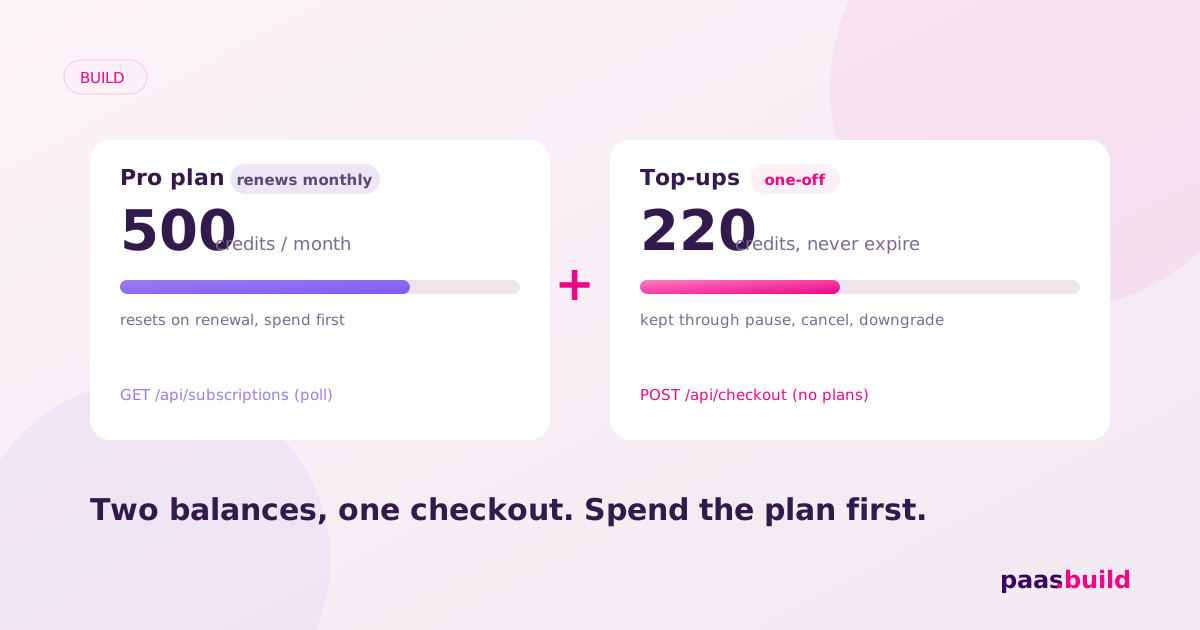
Keep two balances: a monthly plan allowance and purchased top-ups. Reset the allowance after each verified renewal, preserve top-ups under your published expiry policy, and spend plan credits first. Use recurring checkout for Pro or Max and one-off checkout for extra credits. Failed renewal should not erase purchased top-ups.
How should Free, Pro, and Max entitlements work?
Give each tier a server-owned allowance and feature set. Free uses your own scheduled allowance reset; it does not need a paid subscription. Pro and Max receive their allowance after confirmed payment for the relevant cycle. Store the subscription association, last applied cycle, remaining plan credits, and purchased top-ups separately.
For a simple policy, let top-ups never expire and spend plan credits first. If you choose expiry after N days instead, publish N before purchase and track each pack's expiry. Spend the soonest-expiring eligible credits first. These are application policies, not documented paas.build wallet behavior. Reserve usage atomically and reject work when eligible credits run out.
Keep feature access separate from usage. Decide whether a Free user with purchased credits can run the standard model after cancellation. Explain which Pro features require an active plan. For choosing tiers and prices, use the existing AI app pricing guide; this page covers entitlement transitions.
Which checkout do I use for each purchase?
The agent guide documents POST https://paas.build/api/plans once per paid tier. Its fields include env, vendorId, name, price, currency, and periodUOM. Use periodUOM: "month" for monthly plans. Save the returned id. Plan names must be unique per vendor; check the docs.
Recurring checkout uses POST https://paas.build/api/checkout with plans: [planId] and consumer: { reference: userId }, alongside the amount, currency, vendor, and environment. The documented flow takes the first payment, stores the card, and renews automatically. Here is a sandbox setup example, using server-owned prices and an authenticated user ID.
export async function createPlanAndCheckout({
  token, vendorId, name, price, currency, userId
}) {
  async function post(path, body) {
    const response = await fetch("https://paas.build" + path, {
      method: "POST",
      headers: {
        "Authorization": "Bearer " + token,
        "Content-Type": "application/json"
      },
      body: JSON.stringify({ env: "sandbox", vendorId, ...body })
    });
    if (!response.ok) throw new Error("Billing request failed");
    return response.json();
  }
  // Setup example: save id and reuse it for this tier.
  const { id } = await post("/api/plans", {
    name, price, currency, periodUOM: "month"
  });
  return post("/api/checkout", {
    amount: price, currency, plans: [id],
    consumer: { reference: userId }
  });
}
Create each plan once, then reuse its ID for later customers. For a top-up, use the same checkout endpoint without plans, supplying the server's pack amount, currency, and description. Store user and pack metadata in your own order record. Both flows return shortLink and sessionToken; neither field proves payment.
The documented MCP equivalents are create_subscription_plan, create_subscription_checkout, and list_subscriptions; one-off links use create_checkout. Subscription calls require the vendor's own Authorization: Bearer <access token>. Keep it server-side and match its environment. These names are in the agent guide; check the docs for tool arguments.
How do I detect renewal, pause, and cancellation?
Poll GET https://paas.build/api/subscriptions?env=sandbox&vendorId=<id>, optionally adding planId. The agent guide describes { ok, subscriptions: [...], plans, failed } and explicitly says there are no subscription webhooks from paas.build. Run reconciliation on your server schedule, independent of whether the buyer opens your app.
Pause, resume, or cancel with PUT https://paas.build/api/subscriptions/<subscriptionId>, sending env, planId, and status set to "paused", "active", or "cancelled". Re-read status before updating your account screen. The guide does not specify when those changes become effective; check the docs before promising an end-of-cycle cancellation.
Do not treat an unchanged active status as a new paid month. The supplied reference omits item-level renewal payment and cycle fields. It also does not define the meaning of failed. Confirm the authoritative success signal and cycle identifier before implementing allowance resets. Keep the last verified entitlement during a short reconciliation delay, under your stated grace policy.
Which balance can each subscription state spend?
This is a proposed application state machine. Labels such as grace and Free are local states, not claimed API status values. Apply cancellation or pause at the verified effective boundary you have chosen and disclosed.
| Local plan state | Plan allowance | Purchased top-ups |
|---|---|---|
| Free | Free allowance, reset by your schedule | Available for eligible features |
| Paid and current | Spend first; reset on verified renewal | Spend after plan credits |
| Renewal failed, in grace | Keep remaining credits; no fresh grant | Preserve and allow eligible usage |
| Grace ended | Replace paid access with Free rules | Preserve purchased balance |
| Pause or cancellation effective | Apply Free rules; no paid reset | Preserve purchased balance |
Where do I reset the monthly allowance?
Use an internal handler after your poller verifies a successful renewal. Replace the plan allowance rather than adding it. The following ESM module uses a persistent SQLite connection. Your app must create the subscriber's entitlement row and ownership mapping first. The configured allowance map is keyed by your saved plan IDs.
export function makeRenewalHandler(db, allowanceByPlan) {
  db.exec(`CREATE TABLE IF NOT EXISTS entitlements (
    subscription_id TEXT PRIMARY KEY,
    plan_id TEXT NOT NULL,
    cycle_start INTEGER NOT NULL DEFAULT -1,
    plan_remaining INTEGER NOT NULL DEFAULT 0,
    topup_remaining INTEGER NOT NULL DEFAULT 0
  )`);
  const reset = db.prepare(`UPDATE entitlements
    SET plan_remaining = ?, cycle_start = ?
    WHERE subscription_id = ? AND plan_id = ? AND cycle_start < ?`);

  return function renewalSucceeded(verified) {
    // Local record from your trusted reconciliation worker.
    const e = verified;
    if (!e || e.paid !== true) return false;
    const credits = allowanceByPlan.get(e.planId);
    if (!Number.isSafeInteger(credits) || credits < 0 ||
        !Number.isSafeInteger(e.cycleStart) || e.cycleStart < 0 ||
        typeof e.subscriptionId !== "string" || !e.subscriptionId) {
      throw new Error("Invalid renewal record");
    }
    const result = reset.run(credits, e.cycleStart,
      e.subscriptionId, e.planId, e.cycleStart);
    return result.changes === 1;
  };
}paid, planId, subscriptionId, and cycleStart here describe your normalized internal record, not an API response. Derive a monotonically increasing cycle start from verified billing data; never substitute the polling time. The conditional update ignores duplicate or older cycles and leaves top-ups untouched. See Node's SQLite reference for the connection API.
Do not expose this function to browser input. The provider verification adapter is intentionally absent because its contract is unspecified; check the docs. Test repeated polls after spending, out-of-order renewals, and events for a replaced subscription. None should refill the same allowance twice.
What happens when someone upgrades mid-cycle?
Keep the credit policy simple: no proration, and grant only the difference between the new and old plan allowances once. Preserve credits already spent and all top-ups. Record an upgrade adjustment so retries cannot add the difference again. Tell the buyer what they receive and when the next reset happens.
The agent guide says there is no native proration or plan upgrade: cancel and subscribe to the new plan. That is a replacement purchase, not an in-place upgrade endpoint. Explain the new plan's charge and cycle before confirmation. Treat its first payment as the upgrade adjustment, then reset normally at its next verified renewal. Rebind the existing entitlement row to the new subscription, preserve balances, and record that initial cycle so polling cannot grant it again. If you need the old billing anniversary preserved, check the docs.
What should I do when renewal fails?
Choose a short, explicit grace period. Notify the user, keep their remaining eligible credits, and avoid granting a fresh paid allowance. If payment remains unresolved at the deadline, downgrade feature access to Free and preserve purchased top-ups. Decide how Free credits start at that transition so repeated status changes cannot farm allowances.
Do not mark a polling outage as payment failure or invent a retry schedule. Persist the last verified state and retry reconciliation. The supplied API guide does not document dunning controls or card-update endpoints; check the docs before adding recovery actions. Your account page should show the balance source and next action clearly.
What else should I know?
Should unused monthly credits roll over?
For this model, no. Replace the plan allowance after verified renewal. Keep purchased top-ups separate so a monthly reset cannot erase them. Publish a different rollover policy explicitly if you choose one.
Can someone buy a top-up while in grace?
Under the proposed policy, yes. Verify the one-off payment and grant its credits once. A top-up does not resolve a failed subscription renewal or restore paid features by itself.
Can I reset credits whenever polling says active?
No. Require verified renewal success for a distinct billing cycle. Repeated active results are not evidence of another payment. If the required payment and cycle fields are unclear, check the docs before granting credits.
For current charges, see pricing.
Build the payment flow
Review paas.build subscriptions and the agent docs with your coding agent.
See also: Polar.sh alternatives (2026), Paddle alternatives (2026) and the alternatives hub.