Checked on 6 Nov 2026 against Stripe's docs
Stripe Connect account.updated webhook: example payload and what to do with it (2026)
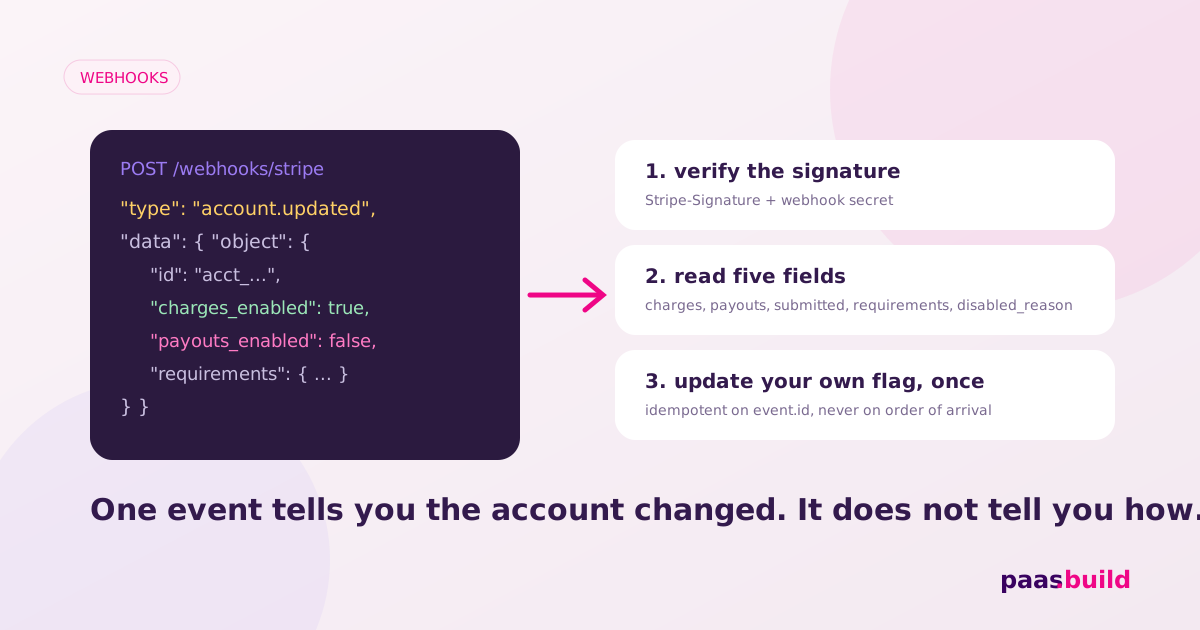
An account.updated event tells you an account property or status changed. It does not mean onboarding succeeded. Verify the signature, read data.object, and refresh your saved payment and payout flags. The practical fix is to derive your UI from account state instead of treating every update as approval. Event types; webhook handling.
What the account object looks like
Illustrative redacted excerpt, not a live capture. The account is inside event.data.object. These fields describe a payout restriction while charges remain enabled. The field names and capability values follow the Account reference.
{
  "id": "acct_REDACTED",
  "object": "account",
  "charges_enabled": true,
  "payouts_enabled": false,
  "details_submitted": true,
  "requirements": {
    "currently_due": [
      "company.address.line1"
    ],
    "past_due": [
      "company.address.line1"
    ],
    "eventually_due": [
      "company.address.line1"
    ],
    "pending_verification": [],
    "disabled_reason": "requirements.past_due"
  },
  "capabilities": {
    "card_payments": "active",
    "transfers": "active"
  },
  "tos_acceptance": {
    "date": 1793836800,
    "ip": "192.0.2.10"
  }
}
A full account.updated example payload
This is a complete illustrative event envelope, with a focused Account snapshot and no omitted-value syntax. Real snapshots contain additional account fields. IDs and IP are redacted placeholders. The example API version is not a recommendation to change yours. Event structure and version; Account structure.
{
  "id": "evt_REDACTED",
  "object": "event",
  "account": "acct_REDACTED",
  "api_version": "2026-10-28.endive",
  "created": 1793923200,
  "livemode": false,
  "type": "account.updated",
  "pending_webhooks": 1,
  "request": {
    "id": null,
    "idempotency_key": null
  },
  "data": {
    "object": {
      "id": "acct_REDACTED",
      "object": "account",
      "charges_enabled": true,
      "payouts_enabled": false,
      "details_submitted": true,
      "requirements": {
        "currently_due": [
          "company.address.line1"
        ],
        "past_due": [
          "company.address.line1"
        ],
        "eventually_due": [
          "company.address.line1"
        ],
        "pending_verification": [],
        "disabled_reason": "requirements.past_due",
        "current_deadline": 1793836800,
        "errors": [],
        "alternatives": []
      },
      "capabilities": {
        "card_payments": "active",
        "transfers": "active"
      },
      "tos_acceptance": {
        "date": 1793836800,
        "ip": "192.0.2.10"
      }
    },
    "previous_attributes": {
      "payouts_enabled": true,
      "requirements": {
        "currently_due": [],
        "past_due": [],
        "eventually_due": [],
        "current_deadline": null,
        "disabled_reason": null
      }
    }
  }
}
previous_attributes describes prior changed values. Use it for diagnostics, not as your current account. Stripe defines account.updated as an account status or property change. A changed field unrelated to onboarding can therefore produce this event too. Event data; account.updated definition.
The five Account fields to read
After checking the event type, account ID and mode, read these five fields from data.object. Their definitions come from the Account reference. The suggested UI actions are application decisions.
charges_enabled: update your processing indicator.payouts_enabled: update your withdrawal indicator independently.details_submitted: record submission progress without equating it to approval.requirements: read due arrays, pending verification, deadline and disabled reason to choose the owner's next action.capabilities: inspect the capability needed by your payment flow, includingcard_paymentsandtransferswhere applicable.
For capability request calls, use our card_payments troubleshooting guide. For document-specific problems, use our verification guide. Keep this handler concerned with receiving and recording changes.
Decision tree for the event you received
Due requirements? Offer a correction action. Only pending review? Show a review message. Platform pause? Route the case to your operations team. Enabled flags and required capabilities? Update the corresponding controls. Those branches follow verification reasons and platform pause behaviour. Avoid a single "approved" branch for every event.
If your endpoint receives nothing, check its scope. In Workbench, select Connected accounts for this v1 event and subscribe to account.updated. Inspect delivery attempts before debugging your business logic. Connect webhook scopes; delivery troubleshooting.
Minimal Node handler with idempotent storage
Install express and stripe. Supply your platform key, the endpoint's whsec_ secret, and STRIPE_LIVE=true or false. The raw request body is required for signature verification. Verify webhook signatures.
import express from "express";
import Stripe from "stripe";
import { store } from "./store.js";

const app = express();
const stripe = new Stripe(process.env.STRIPE_SECRET_KEY);
const secret = process.env.STRIPE_WEBHOOK_SECRET;
if (!secret || !["true", "false"].includes(process.env.STRIPE_LIVE)) {
  throw new Error("Configure webhook secret and STRIPE_LIVE");
}
const live = process.env.STRIPE_LIVE === "true";

// Mount before express.json(): signatures need the raw body.
app.post("/connect", express.raw({ type: "application/json" }), async (req, res) => {
  let event;
  try {
    event = stripe.webhooks.constructEvent(
      req.body, req.headers["stripe-signature"], secret
    );
  } catch {
    return res.sendStatus(400);
  }
  if (event.type !== "account.updated" || event.livemode !== live) {
    return res.sendStatus(200);
  }
  const account = event.data.object;
  if (account.object !== "account" || event.account !== account.id) {
    return res.sendStatus(400);
  }
  try {
    await store.forAccount(account.id, live, async (tx) => {
      if (await tx.hasEvent(event.id)) return;
      // Retrieve inside the account lock to avoid stale snapshot writes.
      const current = await stripe.accounts.retrieve(account.id);
      await tx.updateFlags({
        canAcceptCardPayments: current.charges_enabled === true &&
          current.capabilities?.card_payments === "active",
        canPayout: current.payouts_enabled === true
      });
      await tx.markEvent(event.id);
    });
    return res.sendStatus(200);
  } catch {
    return res.sendStatus(500);
  }
});
app.listen(4242);
store.js is your database adapter, not a Stripe library. Implement forAccount as a durable transaction with a lock for the account and environment. Require an existing seller mapping. Commit flag changes and the unique event-ID record together. Roll back both on failure. All account-state writers must use the same lock.
This storage contract is essential: an in-memory set loses deduplication on restart. Marking the event before saving the flags can lose an update after a crash. A database lock must work across application instances. The snippet is an integration skeleton until you provide this adapter.
Stripe can retry deliveries and does not guarantee ordering. Deduplicate by event ID. Do not permanently deduplicate by account ID plus event type, because later account updates are legitimate. The handler retrieves current state inside the lock so a late snapshot does not overwrite a newer state. Duplicates and ordering; retrieve current account.
Keep the seller mapping separate from event ingestion. Your adapter should reject an unknown account instead of creating a seller from webhook data. Log the event ID and processing result for investigation. Avoid logging the complete account payload, which can include identity information. These are implementation choices for your application.
If signature verification fails, check the endpoint secret and whether middleware changed the body. Parsing JSON and serialising it again is not a substitute for preserving the original bytes. Signature verification requirements.
Keep requests short. At scale, durably enqueue verified events, return success after enqueueing, and run the same transaction in a worker. Stripe recommends asynchronous handling. Asynchronous handlers. Our lock and refresh strategy is an implementation recommendation, not a Stripe-provided transaction primitive.
How to reproduce in test mode
- Run
stripe listen --forward-connect-to localhost:4242/connectand use its signing secret. Test Connect webhooks locally. - Complete a sandbox account using the Accounts v1 walkthrough. Stripe documents an
account.updatednotification when the required information is completed. - Use Dashboard Resend on the event to exercise duplicate delivery. Confirm that the saved flags remain consistent. Manual retries.
These are documented test steps, not a captured run. Test your adapter's rollback and concurrency behaviour separately before deploying this handler.
Keep sandbox and live state separate
Use event.livemode to route state; Connect production endpoints can receive test events too. Sandboxes can allow actions despite inactive capabilities, so test-mode success proves nothing about live permission. Mode handling; testing capabilities.
FAQs
Does account.updated mean the seller is approved?
No. It also covers ordinary property changes. Read the account state before changing your UI. Event definition.
Can I sort updates by event.created?
Do not use it as a strict ordering key. Snapshot timestamps have second precision and delivery order is not guaranteed. Event ordering.
Which webhook secret should I use locally?
Use the secret printed by your CLI listener for forwarded events. A registered endpoint has its own secret. Local testing; endpoint secrets.
Stuck re-verifying connected accounts?
paas.build onboards sellers progressively. If repeated verification is a platform-wide problem, compare the approach and review pricing.
Explore the alternative → View pricingSee also: Mangopay alternatives (2026) and the alternatives hub.