Checked on 6 Nov 2026 against Stripe's docs
Stripe Connect requirements: past_due vs currently_due vs eventually_due (2026)
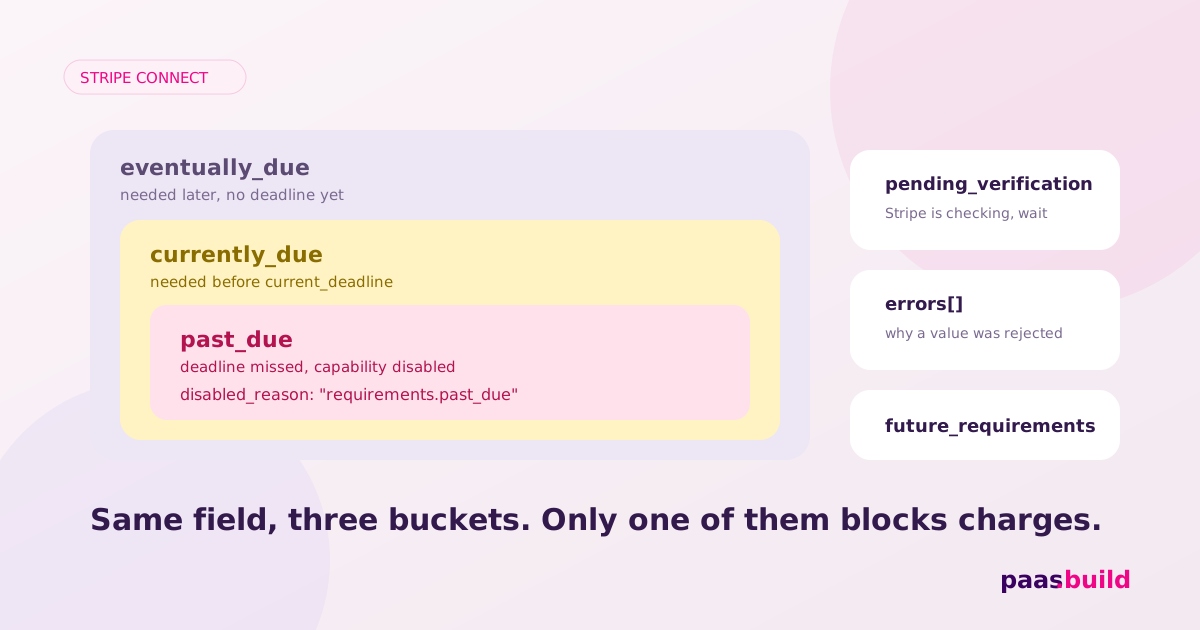
currently_due means information is needed now. past_due identifies overdue requirements that have disabled capabilities. eventually_due includes information needed when applicable thresholds are reached. Resolve overdue fields first, then collect the remaining due fields before their deadline. Read the charge and payout flags to see the account's actual restrictions. Stripe's requirement definitions.
What the account object looks like
Illustrative redacted excerpt, not a live capture. This account can process charges and pay out while a tax-ID requirement has a future deadline. The document is listed for later collection. Stripe documents the fields and allows requirements to overlap between buckets. Account reference; requirement buckets.
{
  "id": "acct_REDACTED",
  "object": "account",
  "charges_enabled": true,
  "payouts_enabled": true,
  "details_submitted": true,
  "requirements": {
    "current_deadline": 1794528000,
    "currently_due": [
      "company.tax_id"
    ],
    "past_due": [],
    "eventually_due": [
      "company.tax_id",
      "company.verification.document"
    ],
    "pending_verification": [],
    "disabled_reason": null
  },
  "capabilities": {
    "card_payments": "active",
    "transfers": "active"
  },
  "tos_acceptance": {
    "date": 1793836800,
    "ip": "192.0.2.10"
  }
}
The timestamp is an example, not a Stripe deadline policy. Read the deadline returned for your own account. Do not hard-code a grace period from a sample or treat the size of a requirement array as a measure of how close the account is to approval.
The three buckets and what they mean
The buckets describe collection urgency. They are not three mutually exclusive account statuses. Stripe says overdue fields remain in currently_due, and newly required fields can appear in both currently_due and eventually_due. Requirement overlap.
| Bucket | Meaning and action | Charges and payouts |
|---|---|---|
past_due | Requirements missed their deadline. Resolve these first. | Relevant capabilities are disabled. Read both enablement flags for the actual effect. |
currently_due | Collect now. Check current_deadline and errors. | Can coexist with enabled processing. Unresolved fields can disable functionality at the deadline. |
eventually_due | Information needed when applicable thresholds are reached. Plan collection or collect up front. | Presence alone does not establish that charges or payouts are disabled. |
Keep pending_verification alongside these buckets. It identifies information under review or potentially needed following review. An item can still overlap with an actionable bucket when one check fails while another remains pending. Do not hide a due task simply because its name also appears in the pending list. Pending verification.
Read disabled_reason without inventing a payment matrix
The following values are explicitly documented in Stripe's disabled-reason guide, plus platform_paused in its pause guide. This is a documented troubleshooting subset, not an exhaustive enum registry. A universal mapping from each reason to both booleans is not documented. Use the returned flags.
| Reason | Meaning and next action | Effect to check |
|---|---|---|
requirements.past_due | More verification information is needed. Resolve the listed fields. | Check which capabilities and enablement flags are disabled. |
requirements.pending_verification | Information is being checked. No action for the review itself. | Do not enable either operation from a submission receipt. |
action_required.requested_capabilities | Request the capabilities your integration needs. | Check their status before offering the corresponding operation. |
platform_paused | Your platform paused payments or payouts. Review the pause in Dashboard. | The affected charge or payout flag becomes false. |
under_review | Stripe is reviewing the account. Inspect Dashboard actions. | Read both flags; this reason is not a completion date. |
listed | A possible prohibited-list match is being investigated. | Read both flags; do not promise reinstatement. |
rejected.fraud | Rejected for suspected fraud or illegal activity. | Inspect available Dashboard information or appeal. |
rejected.incomplete_verification | Verification was incomplete within the required threshold. | Inspect available Dashboard information or appeal. |
rejected.listed | Rejected for a third-party prohibited-list match. | Inspect available Dashboard information or appeal. |
rejected.terms_of_service | Rejected for suspected service-terms violations. | Inspect available Dashboard information or appeal. |
rejected.other | Rejected for another reason. | Inspect available Dashboard information or appeal. |
The rejection descriptions above follow Stripe's documented meanings. An appeal is not guaranteed to exist. If you receive an unfamiliar reason, preserve it for investigation and read the current docs. Do not silently label it "missing documents".
Turn the buckets into one task per requirement
Build a local task list keyed by requirement name. Give an overlapping item the highest urgency: overdue, due now, then later. Keep review status as an additional marker. This is an application design recommendation. It prevents you from emailing the same seller three times about one field.
Use a collection choice deliberately. Hosted onboarding accepts collection_options.fields=currently_due for incremental collection or eventually_due for up-front collection. The owner sees the relevant form. Choose information to collect.
After a correction, refresh your task list from the returned account. Keep the original requirement name and any displayed error with the support ticket. Send one clear action to the owner. For document-specific rejection handling, use our account verification guide; for capability request calls, use the card_payments error guide.
Do not merge future_requirements into this urgency ordering. It describes upcoming requirement changes that do not affect capabilities until they take effect. Its deadline describes movement into requirements. That is different from an existing requirement becoming due after a threshold. Upcoming requirements.
How to reproduce in test mode
- Complete a test account using Stripe's Accounts v1 walkthrough. Save its requirement arrays.
- Create a test charge using
tok_visa_triggerVerification. Stripe documents new due information and a deadline without immediately blocking charges or payouts. Trigger verification thresholds. - Inspect the
account.updatedpayload. For a blocked-state case, use the documentedtok_visa_triggerChargeBlockortok_visa_triggerTransferBlocktest charge, then collect the requested information. Test blocked charges and payouts.
These recipes exercise requirement changes. A trigger that guarantees every item moves through all three buckets in one fixed sequence is not documented. Capture the arrays you actually receive. We did not execute these test calls for this article.
Test the display, then check live eligibility
Stripe sandboxes can permit actions despite inactive capabilities. Test-mode success proves nothing about live enablement. Verify that your UI interprets the returned fields, then check the live account independently. Sandbox capability enforcement.
FAQs
Are the three arrays mutually exclusive?
No. A requirement can appear in multiple buckets. Deduplicate your tasks while preserving their urgency. Requirement definitions.
Does currently_due always stop charges?
No. Read charges_enabled and the relevant capability. Due information can have a deadline before enforcement. Deadlines; Account flags.
Does eventually_due mean future_requirements?
No. future_requirements represents upcoming changes before they take effect. Keep it separate from the requirement buckets used by your current collection flow. Upcoming requirements.
Stuck re-verifying connected accounts?
paas.build onboards sellers progressively. If repeated verification is a platform-wide problem, compare the approach and review pricing.
Explore the alternative → View pricingSee also: Stripe Managed Payments alternatives (2026) and the alternatives hub.